Sign Up with Advertising Companies
The next step is to SignUp/Partner with the companies that you will advertise with. These companies are needed for you to enter your advertisement data with. To sign up with free credit click with the companies below and remeber if you are not using at least 5 search engines to get cheap traffic you are blowing money away!!!! IT'S FREE MONEY! Don't be lazy!!!:
1.
Recommend reading GOOGLECASH
2. Overture.com (US accounts get $25 free credit) (very popular option amongst our affiliates)
3. Findwhat
4. Looksmart
5. Lycos
6. Ah-ha
We will show you how set up a advertising campaign with Google Adwords in the screenshot below.
But First A Bit About Google
The adversting company that most people start with in Google Adwords. Basically, Google Adwords allows your to to buy advertising space on Google pages. You determine where your ads are placed by the content you put in your ad. For example if you have the words "Dog Training" in the title of your ad, when someone searches for "dog training" in Google, your ad will appear on the results pages. To learn more about the working of Google Adwords Click Here. I recommend taking the time to look at the sign up demo, which walks you step by step through the sign up process as well as how to create an ad campaign.
Below is a screenshot of a Google Search Results page. The advertised adverts highlight in red are those that send traffic to Secrets to Dog Training and get paid the 75% commission. 
You do not need to do any selling, because our website will handle all the orders and split the profits with you (75% to you and 25% to us). All you have to do is type the ads online for us. We will then pay you 75% commission for all sales you help generate.
Creating Your Ads
Login to your Google Adwords Account (for overture it is very similar) and click on New Campaign Setup. Now you can enter your campaign name, ad group (for target different keywords) and languages to target (see screenshot below).

Click on continue and now choose the countries you want to promote too (we suggest selecting all countries).

Now you can type in your ads that will be advertised on Google (or Yahoo when using Overture) once setup. Below are three examples that you are welcome to use however as alot of people may be using these we suggest creating your own original ones and having a play around with this feature.
Headline: Use a catchy title to get customers attention.
Description Line 1 & Description Line 2: Avoid using words such as "best" "greatest" and "free". Give a description of the product, while also appealing to a problem that a customer may have that the product will help to resolve.
Display URL: www.secretstodogtraining.com
or sitstayfetch.net are the two most popular ones (if you have your own website use that and then add the hoplink below to your website).
Destination URL: Enter the following hoplink (this tracks your sale)
http://www.kingdomofpets.com/dogobediencetraining/go.php?aff=changeid&type=nohop (make sure you replace "changeid" with your Clickbank ID you had created in step 1, as shown in the 3 screen shots below).
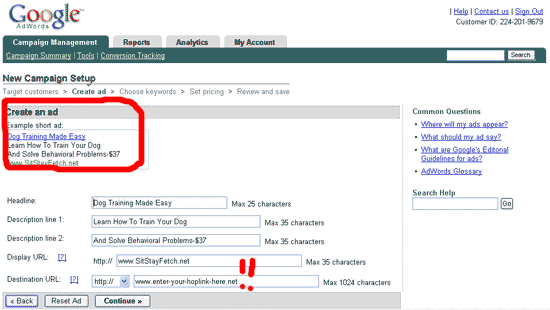
Now you can add the keywords you wish to promote. Click here (set up keywords.php) to see a full list of keywords we have created that you are most welcomed to use.
In the red box below are the keywords. Try to identify with the people you are trying to reach as us keywords that they would be likely to use.

You now need to select how much you are prepared to spend a day. Our beginner affiliates generally allow $30 max to begin with but some of our top affiliates might spend $400-$600 a day.
For your maximum Cost Per Click (CPC) we recommend entering 10cents (0.10) to begin with until you get confident using Adwords and advertising online.

Enter your daily budget. This is the maximum amount that you can be charged by Google Awords on any one day. Once you have spent this amount you add stops appearing.
Your Maximum CPC (Cost Per Click) is the maximum you are willing to spend on each click. One thing to note that if you are sitting at number 1 on that search term your will only be charged 1 cent higher that the second ads maximum CPC. For example if Jim (who sitting at number 2) is advertising another dog training product at 20 cent per click and your maximum CPC is 50 cents, you will only pay 21 cents. That is nice of Google isn't it!

You are then able to review your ad andthe keywords that you ave chosen. Once you have completed this process, it will take around 1 hour before your ads will appear, so be patient.
Best wishes and remember we are here to help you become a very successful affiliate of ours so please feel free to contact us anytime!
|